How AI Image Generation Is Transforming Modern Visual Content Creation
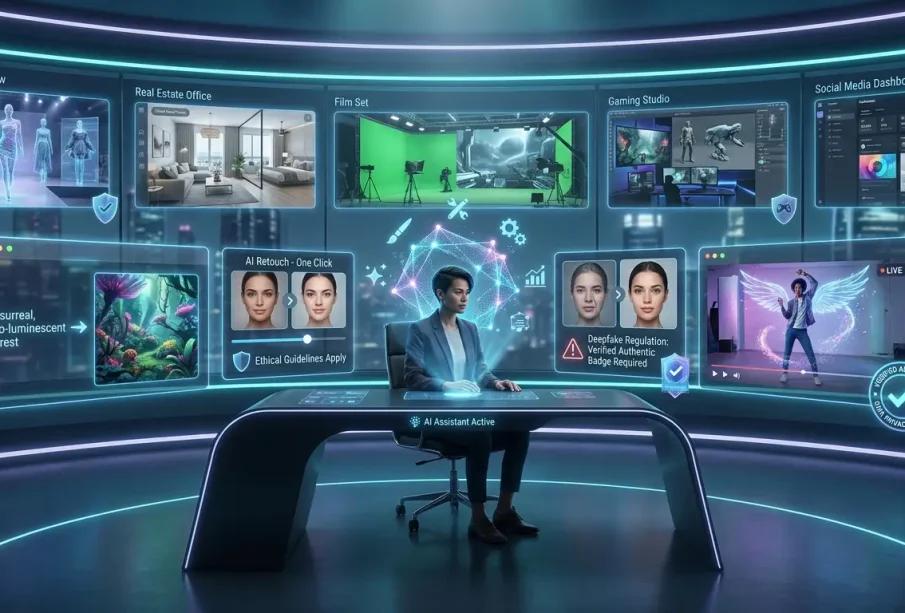
Creating professional visual content once required photography equipment, design software and considerable technical experience. While those skills remain valuable, artificial intelligence is introducing a faster way to move from an initial idea to a usable visual concept.
Modern generative tools can interpret written descriptions and turn them into images within seconds. Some can also use an existing picture as a reference, allowing creators to guide composition, style or visual direction without starting entirely from scratch.
This technology is increasingly useful for marketers, social media creators, designers, small businesses and storytellers. Rather than replacing traditional creative methods, AI image generation can serve as an additional tool for brainstorming, experimentation and rapid content production.
How AI Image Generation Works
At its simplest, generative image technology takes instructions from a user and produces a new visual based on those instructions.
The instructions are usually provided as a text prompt. A creator might describe a subject, location, lighting style, composition and overall mood.
For example, instead of requesting only “a coffee shop”, a more detailed prompt could describe a modern café interior with warm morning light, wooden furniture, indoor plants and a relaxed atmosphere.
The additional context gives the system more information about the intended result.
Tools such as an AI image generator can support both text-to-image and image-to-image workflows. This means creators can begin with a written idea or provide a reference image to influence aspects such as style and composition.
Why Prompt Quality Matters
AI can generate an image quickly, but the quality of the creative direction still matters.
Vague instructions often produce unpredictable results. Detailed prompts provide clearer boundaries for the generation process.
An effective prompt may describe:
- The primary subject
- Background or environment
- Composition
- Lighting
- Camera perspective
- Colour palette
- Artistic style
- Mood
- Intended use
For example, someone creating an e-commerce banner may specify that the product should appear centrally positioned against a minimal background with soft studio lighting and sufficient empty space for advertising text.
This level of detail makes the desired outcome much clearer.
Text-to-Image Versus Image-to-Image Creation
Two common approaches are text-to-image and image-to-image generation.
Text-to-Image
Text-to-image generation begins with written instructions.
This approach is particularly useful during brainstorming because creators do not need an existing photograph, illustration or design. They can describe an idea and rapidly explore several visual directions.
Potential applications include concept art, campaign ideas, fictional environments, social media graphics and storyboard scenes.
Image-to-Image
Image-to-image workflows begin with an existing visual.
The uploaded picture can help guide the system regarding composition, visual structure or style. The creator can then use additional instructions to transform or reinterpret the reference.
This approach is useful when consistency with an existing concept matters.
Faster Creative Brainstorming
One of the strongest applications of generative imagery is rapid experimentation.
A designer planning a campaign might normally sketch several concepts before deciding which direction deserves further development. AI can accelerate this exploratory phase by producing multiple interpretations of an idea.
The objective does not have to be generating a finished asset immediately.
Instead, generated images can function as visual prototypes that help teams discuss:
- Layout
- Mood
- Colour direction
- Composition
- Character appearance
- Campaign themes
This can make early creative discussions more concrete.
Social Media Content Creation
Social media requires a continuous supply of fresh visuals, placing considerable pressure on content teams.
Generative tools can assist with backgrounds, conceptual artwork, seasonal graphics and other supporting assets.
Aspect ratio is particularly important. A square visual may work for one placement, while vertical content is better suited to certain mobile-first formats and widescreen imagery may be appropriate for video thumbnails.
Planning the final placement before generating an image can reduce unnecessary cropping and redesign later.
Creators should still maintain consistency with their established visual identity. Generating dozens of unrelated styles may produce individual images that look impressive but fail to create a recognisable brand.
Product Visualisation and E-Commerce
E-commerce is another area where AI-generated imagery can support creative workflows.
Traditional product photography remains important when customers need an accurate representation of the item they are purchasing. However, generative technology can help create supporting visuals for advertising concepts, banners and campaign backgrounds.
A business might photograph its real product and then experiment with different environments or promotional concepts around it.
Human review remains essential because generated visuals can introduce inaccurate details. Any image representing a real product should be checked carefully before publication.
Creating Storyboards and Concept Art
Film-makers, video creators and advertising teams frequently use storyboards before production begins.
A storyboard helps communicate camera angles, locations, character positions and the sequence of events before resources are committed to filming.
AI generation can make this process faster.
Instead of drawing every concept manually, a creator can describe individual scenes and generate visual references. These images can then be arranged into a rough sequence for discussion.
They do not necessarily need to become final production assets. Their value may simply be helping everyone understand the intended creative direction.
Moving From Static Images to Video
An increasingly interesting development is the connection between image generation and video creation.
A generated still can become the starting point for an animated sequence. Motion, transitions, text, music and other video elements can then be introduced during editing.
This creates a workflow that may begin with:
Idea → Prompt → Image → Refinement → Animation → Video Edit
For creators producing reels, promotional content or short storytelling pieces, having image and video tools within a connected workflow can reduce the need to move assets repeatedly between separate applications.
Editing Still Matters After Generation
Generation should not be confused with completion.
Even a strong result may require additional work before publication.
Common adjustments include:
- Cropping
- Brightness correction
- Contrast adjustments
- Saturation changes
- Sharpening
- Background refinement
- Resolution enhancement
Editing also gives creators an opportunity to add their own visual identity rather than publishing the first generated result unchanged.
A useful workflow is therefore to generate, review, refine and only then export.
Choosing the Right Resolution
More resolution is not automatically better.
The appropriate resolution depends on how the final image will be used.
A social media graphic viewed primarily on smartphones has different requirements from artwork intended for a large-format print. Generating or exporting unnecessarily large files can increase storage requirements without providing a noticeable benefit.
Creators should consider the final display dimensions before choosing export settings.
Responsible Use of Generated Images
Generative technology makes visual creation easier, but creators still need to use it thoughtfully.
Before publishing an image, review it for inaccurate details, misleading representations, unwanted text and visual inconsistencies.
Businesses should also check the applicable licensing and usage terms for the specific platform and model being used, particularly when content is intended for commercial projects.
Human oversight becomes even more important when imagery involves products, real-world events or factual information.
AI as a Creative Assistant
The most practical way to approach generative technology is as a creative assistant rather than an automatic replacement for designers, photographers or artists.
AI can help with speed and experimentation. Humans remain responsible for context, taste, storytelling and final quality.
A skilled designer may use generated imagery to explore ten ideas rapidly before developing one manually. A marketer might create visual concepts before briefing a professional photographer. A video creator might generate a storyboard before filming.
In each case, AI accelerates part of the process without eliminating human creative judgement.
Conclusion
AI-powered image generation is changing how visual ideas move from imagination to execution. Text-to-image tools make it possible to explore concepts without starting assets, while image-to-image workflows give creators greater control through visual references.
The technology has practical applications across social media, marketing, e-commerce, storyboarding, concept development and video production. Its greatest advantage is not simply the ability to generate an image quickly, but the ability to experiment with more ideas in less time.
Successful results still depend on clear prompts, careful review and thoughtful editing. As image generation becomes increasingly connected with photo and video editing workflows, creators will have more opportunities to turn simple concepts into polished multimedia content while retaining human control over the final creative direction.